Jump to content
Age of History
  • 0
andry202222

Map problem

Question

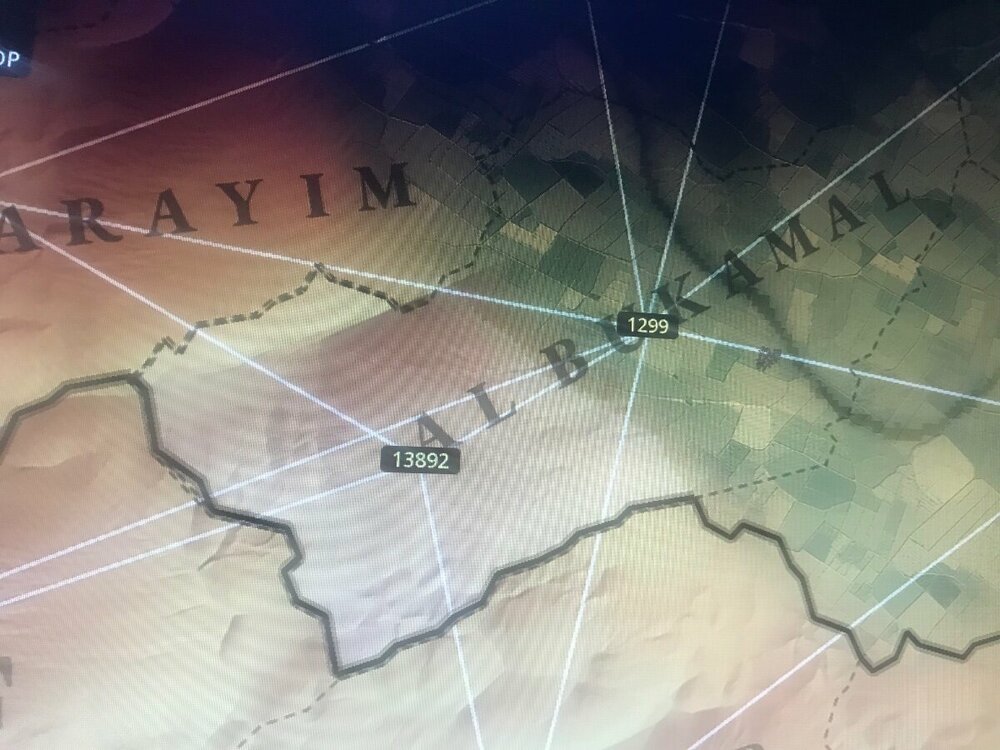
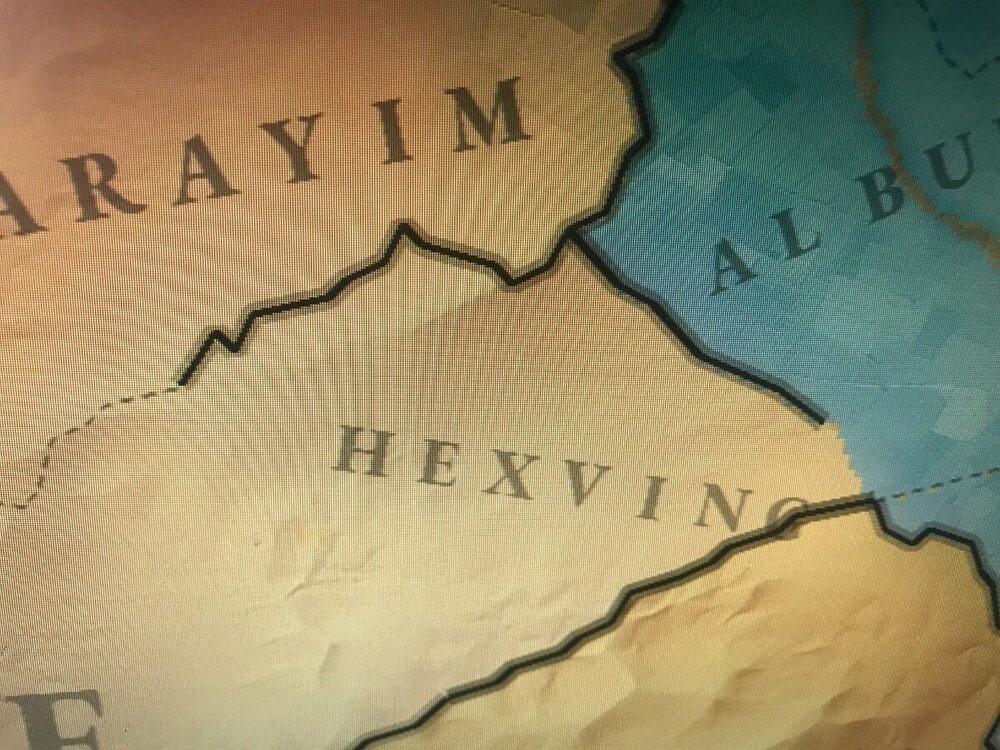
hello @Łukasz Jakowski, for the past few days i have been trying to edit the original game provinces (to add some provinces) using the map editor given in /map/, i’ve tried many ways but it always ended up bugging and not working, i have even tried doing it in a copy of earth3 with different name and deleting some files in map/earth3/data but nothing worked. So i’m obligated to ask for help here, here’s some pictures of how the provinces look in game:IMG_2663.thumb.jpeg.2ca14aa7cfbd788dd0ca4759bea45af5.jpegIMG_2695.thumb.jpeg.530f6a408db32f17233aad572b82dd10.jpeg
Share this post


Link to post
Share on other sites

Recommended Posts

  • 1

In the map editor, press 'J' to delete province 1299. Then redraw a smaller version of this province and press Enter to save.

Next, add a new province in the empty space that you have left.

After that, in the game's map editor, edit the province connections for both the old and new provinces.

For old province edit province name position in the game -> map editor.


Set up terrain, growth rate, and other settings for the new province.

Share this post


Link to post
Share on other sites

  • 0
1 hour ago, Łukasz Jakowski said:

In the map editor, press 'J' to delete province 1299. Then redraw a smaller version of this province and press Enter to save.

Next, add a new province in the empty space on the left.

After that, in the game's map editor, edit the province connections for both the old and new provinces.

For old province edit province name position in the game -> map editor.


Set up terrain, growth rate, and other settings for the new province.

Thanks! I’ll try this and let you know if it works!

Share this post


Link to post
Share on other sites

  • 0
17 hours ago, Łukasz Jakowski said:

In the map editor, press 'J' to delete province 1299. Then redraw a smaller version of this province and press Enter to save.

Next, add a new province in the empty space that you have left.

After that, in the game's map editor, edit the province connections for both the old and new provinces.

For old province edit province name position in the game -> map editor.


Set up terrain, growth rate, and other settings for the new province.

I tried doing that and it now looks like this how do i fix this IMG_2714.thumb.jpeg.3e48e9cb0e597c5db0ae81f3027c6421.jpeg

Share this post


Link to post
Share on other sites

  • 0
44 minutes ago, Łukasz Jakowski said:

In this menu click on province 13892 and click R to rebuild, and any other province which doesnt look as should be.

Also remove old connections between provinces which are not longer connected

Yes i did that many times and it still looked like that

Share this post


Link to post
Share on other sites

  • 0

Try to delete every file in "Earth3\data\ProvinceNeighboringProvinces" this will remove all connections. Then open the map editor and generate connections.

Edited by Iceman

Share this post


Link to post
Share on other sites

  • 0
3 minutes ago, Łukasz Jakowski said:

Better not do it on this map, because all connections to the islands will be removed

So what is the fix to this? I’ve tried everything and nothing worked

Share this post


Link to post
Share on other sites

  • 0
28 minutes ago, andry202222 said:

So what is the fix to this? I’ve tried everything and nothing worked

Wait... take a picture of the province in-game, with the province selected (when the province border gets yellow)

Share this post


Link to post
Share on other sites

  • 0
13 minutes ago, Iceman said:

Wait... take a picture of the province in-game, with the province selected (when the province border gets yellow)

It looks exacfly like this, nothing has changed IMG_2714.thumb.jpeg.f54faf0497f2e70517dd05e9eef6e755.jpeg

Share this post


Link to post
Share on other sites

  • 0
10 minutes ago, andry202222 said:

It looks exacfly like this, nothing has changed 

This is in the province connections screen. I want to see it in-game, like the first image of this topic.

Share this post


Link to post
Share on other sites

  • 0
18 minutes ago, Iceman said:

This is in the province connections screen. I want to see it in-game, like the first image of this topic.

Its just like a normal province without any nation owning it and it also has no borders

Share this post


Link to post
Share on other sites

  • 0
4 minutes ago, andry202222 said:

Its just like a normal province without any nation owning it and it also has no borders

Then set a owner in the scenario editor. I want to see if the border is bugged like in the first image.

Share this post


Link to post
Share on other sites

  • 0
3 minutes ago, Iceman said:

Then set a owner in the scenario editor. I want to see if the border is bugged like in the first image.

I did, the province looks exactly like it shows in the map editor (IMG_2714.thumb.jpeg.b0fd7cc661d3a01bfea704b4b5f09bb4.jpeg) but with a owner in it

Share this post


Link to post
Share on other sites

  • 0
14 minutes ago, Iceman said:

Remove these two connections
image.thumb.png.1335dea568c01c6b24032f8a33d56b75.png

When i say i tried everything i mean it, what i need right now is the province to be good and not be out of its order like that prpvince over there

Share this post


Link to post
Share on other sites

  • 0
7 hours ago, Łukasz Jakowski said:

Better not do it on this map, because all connections to the islands will be removed

Yea I have the exact same problem but not only that but also new provinces I make look completely different from the ones I made in the editor for some reason but when I delete and redraw the ones I made before they come out fine.

Share this post


Link to post
Share on other sites

  • 0
10 hours ago, EdgeLord said:

Yea I have the exact same problem but not only that but also new provinces I make look completely different from the ones I made in the editor for some reason but when I delete and redraw the ones I made before they come out fine.

I’ll try that, thanks!

Share this post


Link to post
Share on other sites

  • 0
10 hours ago, EdgeLord said:

Yea I have the exact same problem but not only that but also new provinces I make look completely different from the ones I made in the editor for some reason but when I delete and redraw the ones I made before they come out fine.

It worked, thank you so much!!

Share this post


Link to post
Share on other sites

  • 0
1 hour ago, Łukasz Jakowski said:

Are you creating your map in the mods folder?

If so please read:


Create Own Map - Don't use mods folder! While you are working on the map!

but im not making a new map im modifying the existing aoh3 map

Share this post


Link to post
Share on other sites

  • 0
50 minutes ago, Łukasz Jakowski said:

No you need to change the name position for province Sayn in the map editor

Yes i did that with all provinces but still on some provinces the border looks very weird


like this original photo

IMG_2663.thumb.jpeg.6bc2fb97c38b06814c731cb1cceb5b26.jpeg

Share this post


Link to post
Share on other sites

Join the conversation

You can post now and register later. If you have an account, sign in now to post with your account.

Guest
Unfortunately, your content contains terms that we do not allow. Please edit your content to remove the highlighted words below.
Answer this question...

×   Pasted as rich text.   Paste as plain text instead

  Only 75 emoji are allowed.

×   Your link has been automatically embedded.   Display as a link instead

×   Your previous content has been restored.   Clear editor

×   You cannot paste images directly. Upload or insert images from URL.


×
×
  • Create New...

Important Information

We have placed cookies on your device to help make this website better. You can adjust your cookie settings, otherwise we'll assume you're okay to continue. Age of History Games